
Bre-B Key (Colombia)
Bre-B Keys are a core component of Colombia’s instant payment ecosystem, enabling fast and secure transactions through simple identifiers such as a mobile number, email address, national ID, or custom alias. By linking these identifiers to a bank account or digital wallet, Bre-B streamlines the payment experience and reduces friction, allowing users to send or receive funds without needing to share full account details or rely exclusively on QR codes. This approach improves usability while maintaining security and interoperability across participating institutions.
Bre-B Key Support
Our integration supports payment flows that use Bre-B Keys as transaction identifiers within the Bre-B ecosystem.
Bre-B Keys are not generated, assigned, or managed by our platform. Our service only processes payments using valid Bre-B Keys provided as part of the payment request.
Supported Key Types
The integration supports the following Bre-B Key types:
name: Key based on the first 12 characters of the client’s alias, excluding spaces.id: Key based on the first 9 to 10 digits of the client’s identification number.random: Key composed of randomly generated alphanumeric characters.open_input: Key composed of a custom alphanumeric value defined externally.
Key Format Reference
name
21
Based on the client alias
@CBARG452PEXTOCOLOMBI
id
17-18
Based on the client identification number
@CBAQ1ER9001234567
random
10
Random alphanumeric value
@CBAQ1EXD8
open_input
21
Custom alphanumeric value defined externally
@MYPERSONALIZEDKEY123
Payment Process Flow
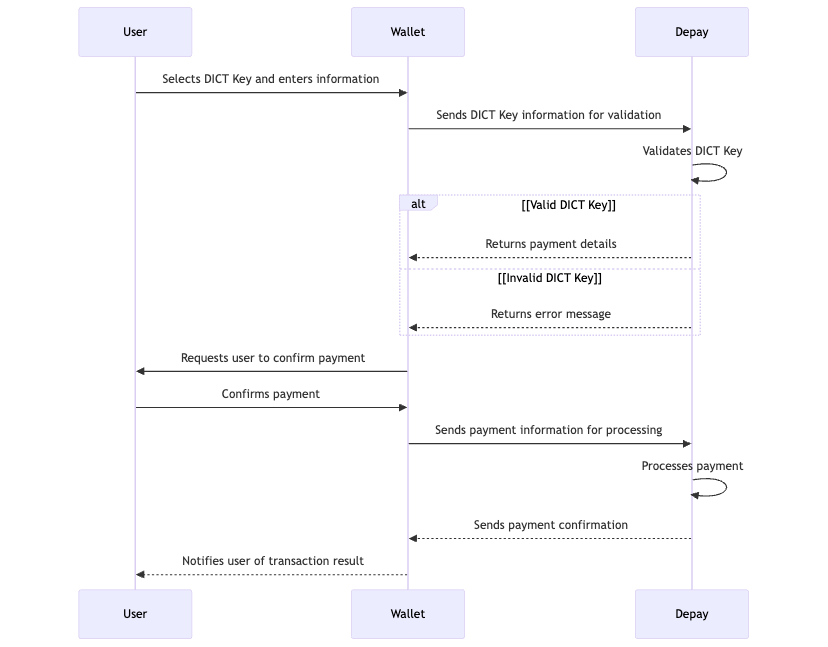
The payment process starts when the user provides a valid Bre-B Key through their digital wallet. This key may correspond to a phone number, email address, identification number, or custom alias registered within the Bre-B ecosystem.
The wallet sends the key to Depay, which validates the payment request and retrieves the information required to continue the transaction flow. If the key is valid and the payment data can be resolved, Depay returns the corresponding payment details to the wallet.
The wallet presents this information to the user for confirmation. After the user authorizes the transaction, the wallet submits the payment instruction to Depay, which processes the payment and returns the resulting transaction status.
Depay then communicates the final status of the payment to the wallet, enabling the user to know whether the operation was completed successfully or whether an error occurred during processing.
Statuses of an Order
CREATED
The order has been created.
PROCESSING
The payment was accepted and is being processed.
COMPLETED
The payment was successfully completed.
CANCELED
The preview was not accepted by the user or it expired.
REFUNDED
The order has been refunded.
PARTIALLY_REFUNDED
The order was partially refunded.
REJECTED
The payment has been rejected by the destination bank account.
FAILED
The payment failed due to an unexepcted error.
Validate Bre-B Key
POST https://stage.api.payments.depay.us/v2/payments/validations/dictkey
Endpoint used to validate Dict Keys. It returns the user information associated with a Dict Key.
Headers
Authorization*
String
Bearer Token
idempotency-key
String
An idempotent identifier provided by the client to ensure that a request is processed only once.
Request Body
dict_key*
String
Bre-B Key used for the payment, such as a phone number, email address, identification number, or custom alias.
local_country
String
Optional field, country where the recipient is from. It must be provided in ISO 3166-1 alpha-2 format (e.g., "CO" for Colombia). Default value is BR.
Response
Retrieve Preview to Pay with a Bre-B Key
POST https://stage.api.payments.depay.us/v2/payments/previews/dictkey
This endpoint retrieves the information required to initiate a payment using a valid Bre-B Key. Similar to the Retrieve QR Code Preview flow, it returns the transaction details needed to generate a payment preview for user review before the payment is confirmed.
Headers
Authorization*
String
Bearer Token
idempotency-key
String
An idempotent identifier provided by the client to ensure that a request is processed only once.
Request Body
dict_key*
String
The DICT Key (CPF, CNPJ, email, phone number, UUID v4) used for payment.
amount*
Decimal
Amount value of the operation. The currency is automatically set to BRL by the server.
external_reference*
String
The user-defined identifier used to link and track the payment. Length (max): 100.
notification_url*
String
The provided URL is a POST endpoint where payment information will be received. Length (max): 250.
local_country
String
Optional field, country where the recipient is from. It must be provided in ISO 3166-1 alpha-2 format (e.g., "BR" for Brazil). Default value is BR.
user*
String
User information
full_name*
String
User name and surname
currency*
String
Represents the default currency the user will use to make the payment. It must be provided in ISO 4217 format
account_number*
String
User account from which the user wishes to make the payment
tax_id*
String
User tax identification number. Length (max): 50.
Response
Preview Callback Response
This response will be sent to the callback (notification_url). There are two possible responses: one for the open_amount QR code, which asks for the amount, and another for the closed_amount QR code, which sends the preview directly.
payment_type
String
Payment Type (always "DICT_KEY")
external_reference
String
This is the reference sent in the request, allowing the requester to internally identify the payment being performed. Length (max): 100.
collector
Object
Information object about the merchant (seller). This information is only available for successful read cases.
name
String
Name of the merchant.
identification_number
String
Unique Tax Identification Code of the administrator.
branch_office
String
Internal merchant or branch office number. Can be empty.
order
Object
Information object about the order to be paid. This information is only available for successful read cases.
id
String
Identifier of the order. This data is necessary when initiating the payment of this QR.
local_total_amount
Decimal
The total amount in the currency of the QR code's country. If it is an open amount QR (status: open_amount), the value will be null.
local_currency
String
Currency of the QR code's country. (ISO 4217 format).
user_total_amount
Decimal
The local_total_amount is converted into the user's currency. If it is an open amount QR (status: open_amount), the value will be null.
user_currency
String
User's currency (ISO 4217 format).
version
String
Version of the API you are woking with
Pay with a Bre-B Key
POSThttps://stage.api.payments.depay.us/v2/payments
This endpoint initiates a payment transaction using an existing Bre-B Key. It requires a valid key provided within the payment flow, such as a phone number, email address, identification number, or custom alias.
Upon receiving the Bre-B Key, the system processes the transaction request. In some cases, the final payment result may be available immediately. If additional processing time is required, the final result can be obtained either through a webhook notification for the Bre-B Key payment event or by querying the operation status endpoint to confirm the payment outcome.
Headers
Authorization*
String
Bearer Token
idempotency-key
String
An idempotent identifier provided by the client to ensure that a request is processed only once.
Request Body
order_id*
String
Order identifier. This field corresponds to the id field within the order object retrieved from the QR information retrieval endpoint. Required.
status*
String
This field is the value of the user's decision. The accepted values are 'accepted' or 'rejected'
notification_url*
String
The URL where notifications about QR payments events will be sent. Required. Length (max): 250.
Response
order_id
String
Identifier of the order. This data is necessary when initiating the payment of this QR.
external_reference
String
This is the reference sent in the QR preview request, allowing the requester to internally identify the payment. Length (max): 100.
external_reference_id
String
This is the reference sent in the QR preview request, allowing the requester to internally identify the payment. Length (max): 100.
status
String
A key that indicates the current status of the order.
date
String
Date and time when the notification is created. Format: YYYY-MM-DDTHH:MM:SSZ (ISO 8601).
payment_date
String or Null
Date and time when the payment was processed. Format: YYYY-MM-DDTHH:MM:SSZ (ISO 8601).
merchant_identification_number
String
Unique identifier assigned to the merchant by the payment processor.
merchant_name
String
Display name of the merchant associated with the transaction.
error_code
String or Null
Error code returned in case the payment fails. Null if the transaction was successful.
Order Refund
The refund can be either partial or full, as specified in the request. Depay will send updates regarding the refund status — such as whether it was successful or rejected — to the notification_url previously provided in the body of the Payment Request.
The refunded amount will be credited to your pre-funded account to ensure uninterrupted service.
REFUNDED
The refund has been successfully completed.
Yes
PARTIALLY_REFUNDED
The partial refund has been successfully completed.
No
Headers
idempotency-key
String
An idempotent identifier provided to ensure that a request is processed only once.
Webhook Notification
This notification will be sent to notification_url.
order_id
String
Order identifier. This field corresponds to the id field within the order object retrieved from the QR information retrieval endpoint.
external_reference
String
This is the reference sent in the QR preview request, allowing the requester to internally identify the payment. Length (max): 100.
status
String
A key that indicates the current status of the preview.
date
String
Date and time when the notification is created. Format: YYYY-MM-DDTHH:MM:SSZ (ISO 8601).
payment_date
String
Date and time when the payment was processed. Format: YYYY-MM-DDTHH:MM:SSZ (ISO 8601).
merchant_identification_number
String
Unique identifier assigned to the merchant by the payment processor.
merchart_name
String
Display name of the merchant associated with the transaction.
error_code
String or null
Error code returned in case the payment fails. Null if the transaction was successful.
amount
Number
Transaction amount to be paid by the user.
currency
String
ISO 4217 currency code representing the transaction currency (e.g., USD, EUR, BRL).
Get Payment Status
GET https://stage.api.payments.depay.us/v2/payments/{order_id}/status
Allows users to inquire about the current status of their payments.
Headers
Authorization*
String
Bearer Token
Query Parameters
order_id*
String
Order identifier. This field corresponds to the id field within the order object retrieved from the QR information retrieval endpoint. Required.
Response
Last updated